West Highland Yachting Week

West Highland yachting Week is one of Scotland’s top sailing events. Webcraft has managed and hosted the site since 2008, during which time it has gone through several iterations and recreations.

Features include:

  • Online entry form
  • Online Payment
  • Twitter feed
  • Sponsor pages linked by logo
  • Home page slide show
  • Extensive photo galleries

As this is a very dynamic event the staff at WHYW are able to update large sections of the site themselves, including Sailing Directions and the all-important Results.


SV Stramash

A website created specifically to record the voyages of this Endeavour 44 and her skipper when she sets off into the vast blue yonder next year (2022)

Features:

  • Posts appear in chronological order on home page – perfect format for a log
  • Video gallery
  • Site will allow embedding of real-time tracking data when the boat is at sea 

AS Yacht Services

AS Yacht Services offers a full yacht rigging service in Argyll and anywhere in  Scotland. A young company that already has more work than it can cope with, partly thanks to the online ‘request a quote’ form.

Features:

  • Detailed description of technical services offered
  • ‘Get A Quote’ request form provides an effective call to action
  • Illustrations of recent projects and testimonials from satisfied clients.

Mainsail Marine

Small, no-frills website for a local boat repair business. Designed to perform well for relevant searches (such as ‘fibreglass yacht repair argyll’), this modest site brings in plenty of business. 

Features:

  • Online enquiry form
  • Clear pictures of the type of work undertaken
  • Good search engineperformance for relevant searches

BlueMoment Sailing Forum

This small yachting forum has become a  local legend on the West Coast of Scotland. Created in the evergreen PHPBB forum system and lovingly kept up to date over 20+ years.

Features:

  • Threaded forum discussions
  • Powerful database, easy to style
  • Easy to install anti-spam measures
  • Advertising modules allow for monetisation

The Corryvreckan Whirlpool

The world’s second largest whirlpool is also a magnet for tourists. This fsacinating website was created as a ‘feeder’ site for a local boat tour business. It is a fascinating look at a unique natural phenomenon.

Features:

  • Custom menu system and image caption styling
  • A fascinating collection of media relating to the subject
  • Pages of facts and legends about the Corryvreckan

HTTPS – encrypt your website now

For the past several years, Google has been strongly advocating that sites adopt HTTPS encryption. Within the last year, users of Googlge Chrome will have noticed that Google has been  gradually marking a larger subset of HTTP pages as “not secure”.

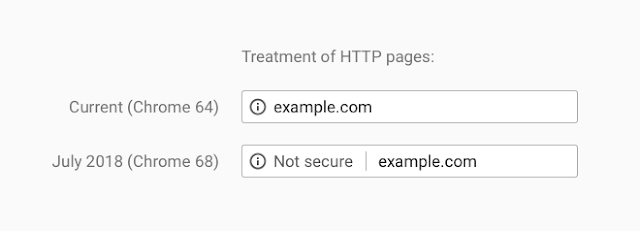
At the moment users will only see the ‘not secure’ warning on pages where personal details are collected, such as forms, or on purchase pages. However, beginning in July 2018 with the release of Chrome 68, Chrome will mark all HTTP sites as “not secure”.

Chrome currently indicates HTTP connections with a neutral indicator. This doesn’t reflect the true lack of security for HTTP connections. When you load a website over HTTP, someone else on the network can look at or modify the site before it gets to you.
 
A substantial portion of web traffic has transitioned to HTTPS so far, and HTTPS usage is consistently increasing. More than half of Chrome desktop page loads are now served over HTTPS. 
 
All our new websites use https protocol by default, and we are in the process of converting all our client sites at no cost to the client.

Do I need SSL for my website ? What is it ?

What is SSL ? How do I know if my website has it ?


SSL stands for Secure Sockets Layer. It is a protocol which encrypts all data sent between a website and the viewer.

If your website has SSL installed the URL visitors see when they visit your website will begin with https:// instead of http://, and there will be a padlock symbol displayed in the address bar of the browser . (See below to see what it looks like in Chrome)

What does this mean? Why is it important?

In the past it was only considered important for a website to use SSL if data such as credit card information was transmitted. Most modern e-commerce stores get round this by using external payment gateways that take the user off-site to complete purchases (eg to the PayPal site).


However, many websites use forms which transmit personal details. This data is transmitted in unencrypted format and it is possible for hackers to intercept these details. These include contact forms or the forms that people use to sign in eg to WordPress websites. While it is unlikely, it is possible for passwords used on forms to be intercepted.

SSL is becoming the new norm

Google believes users deserve and increasingly expect a secure and private online experience when using a website. Consequently, they will in future be penalizing HTTP connections in terms of the security information they give users, and also in terms of search results priority.

At the moment, if you go to a standard http:// web page using Chrome you will see this symbol to the left of the URL:

If you click on the ‘i’ symbol you will see a moderate warning that the site is not secure. However, if you open a page with a form requiring sensitive information on it – such as the login page for a WordPress site, you will now see a clear warning that the page is not secure:

Obviously this is likely to make users feel a little bit worried – or insecure – and Google has warned that this ‘Not Secure’ warning is to be extended to any pages with forms in the next revision of the browser. In the future, it is likely that ALL http:// pages will be tagged as not secure.

In addition, Google allocates a slight ranking bonus to SSL sites in search results – not huge, but only likely to increase in future.


So should I move my site to https:// now, or can I wait ?

 The use of https:// is going to rapidly become the norm so yes, probably now or in the very near future is the time to do it.


Oh no, isn’t this going to cost me a fortune?

Not necessarily. SSL certificates can be purchased from your hosting company for as little as $30 per annum including setup –  though some may charge a lot more. Do make sure the fee includes setting up your certificate on the server, as it can be a b it complicated for the average website owner.

More expensive certificates may offer a warranty against the encryption being broken. For most people this isn’t necessary though as all they really need is the reassurance for their visitors that the data is encrypted – and the actual encryption is just as strong on cheap certificates as on more expensive ones.

Some hosting companies also offer free SSL via a new certificate issuing authority called ‘Lets Encrypt’.


So I’ve got an SSL certificate – now what?

Now you need to convert your website to use the https:// protocol. If you have a CMS such as WordPress this can be relatively straightforward using a plug-in.

If you do not have a CMS then you will need to convert all your links to https://   then set up 301 redirects from HTTP to HTTPS via an .htaccess file. If you know what this means, then you can probably do it yourself – otherwise ask your web developer.


I want to move to https:// – can you help me?

We have installed LetsEncrypt on our servers and are currently converting all existing WordPress sites hosted by us  to SSL as a free upgrade.

For other sites – non-Wordpress or hosted elsewhere – please ask us to quote.

Wetfoot

A very simple WordPress site created sonme time ago for an underwater photographer. There is an unusual music player and sound file on the home page, and lots of pictures of wrecks and fish.

Features:

  • A fantastic collection of underwater photographs 
  • Optional mood music
  • A really simple WordPress site still functioning perfectly after many years
1 2 3 4 5